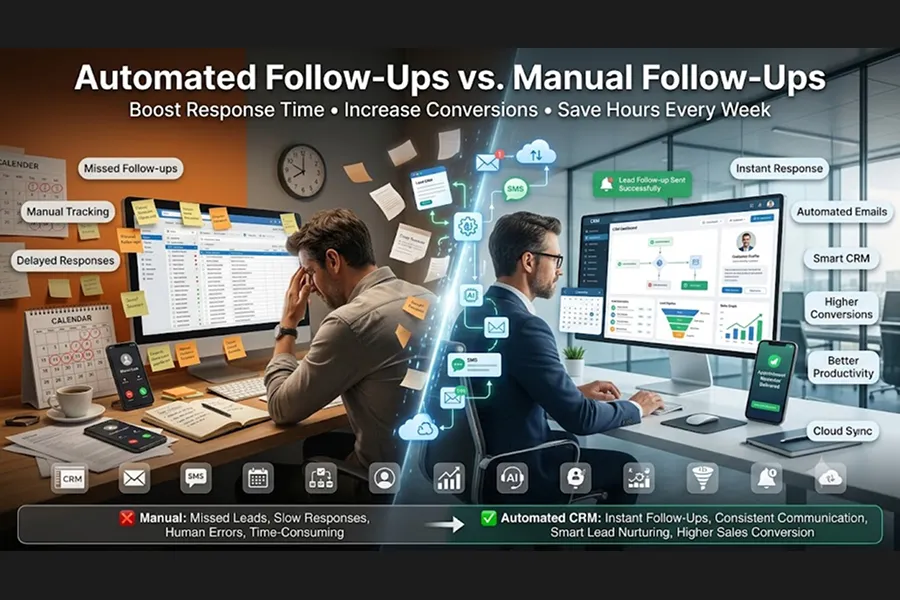
Automated Follow-Ups vs. Manual Follow-Ups: Which Delivers Better Results?
In today’s competitive business environment, following up with leads is no longer discretionary it's critical. Research backs up the fact that most buyers don’t buy beyond the first touch. Rather, they require many touch points before they decide to buy. Yet many small businesses still rely on handwritten reminders, spreadsheets, sticky notes, or memory to track follow-ups. The result? lost revenue, delayed reactions, and missed opportunities
With the development of small business automation, organizations may now automate repetitive processes while preserving meaningful client interactions. But does automation truly beat manual follow-ups? Or is it still possible to add a personal touch?
Let’s evaluate these tactics and see which one generates greater business results.
What manual follow-ups are?
Manual follow-ups are when a salesperson or business owner directly follows up with a prospect via phone, email, text message, or social media. Every rA person oversees every reminder, every chat, and every next step.its of Manual Follow-Ups
Deeply personalized talks
Enhanced relationship-building for premium clientele
Ability to tailor messages according to customer answers
Best for complex or high-ticket sales
Challenges of Manual Follow-Up
Personal communication is effective, but manual processes also have their drawbacks:
Follow-ups are memory or manual prompts.
Responses may be delayed due to busy schedules.
Missed opportunities due to human error.
The volume of leads grows, making it challenging to scale.
With more customers, manual follow-ups aren’t enough to handle the volume of requests.
Automated follow-ups: What are they
In a small business CRM, automated follow-ups use workflows, triggers, and scheduling tools to automatically send emails, text messages, appointment reminders, and task alerts.
The system uses predetermined rules instead of memory, such as:
Send a welcome email shortly after the form is submitted.
Check back in three days.
Alert the sales team when a lead clicks an email.
Automatically assign follow-up tasks.
The modern CRM software ensures that all leads receive timely communication without requiring manual effort each time.
Why automation gets better results
1. Faster response time
Customers want speedy responses. Workflows are automated when a person arranges an appointment, fills out a form, or requests information.
A speedier answer generally enhances engagement because prospects know they have received a response to their query.
2. Ongoing Lead Nurturing
Poor products are not the number one reason why firms lose sales; inconsistent follow-up is.
Automation for small businesses means every prospect receives the correct message at the right time on day one, day three, and day fourteen.
Being consistent creates trust and keeps your business front of mind.
3. Improved Productivity
Rather than wasting hours on repeating emails or reminders, sales teams may focus on discussions that truly clinch business.
Automation takes care of the routine admin work, and employees do the connection development.
4. Enhance the Customer Experience
Today's clients need fast information, appointment reminders, order confirmations, and personalized communication.
All of these are provided through automation, allowing clients to receive them without waiting.
When It Still Matters to Follow Up Manually
Automation doesn’t eliminate the need for human engagement.
Manual follow-ups are more useful in the following cases:
Closing high-ticket sales
Dealing with customer objections
Contract negotiations
Following up on VIP clients
Developing long-term relationships
These discussions involve empathy, creativity, and trust traits that technology cannot entirely replace.
The Hybrid Approach: Merging the Best of Both Worlds
The best-performing companies don’t select automation or manual follow-up.
They combine the two.
A good workflow is as follows: Lead makes an inquiry.
Lead makes an inquiry.
The request is acknowledged immediately via automatic email and SMS.
The lead enters a nurture sequence.
The CRM for small business informs the salesperson when the lead interacts.
The salesperson calls at the right time, personally.
Automated reminders are sent until the agreement is closed.
This hybrid approach marries the efficiency of technology with the human touch that establishes lasting client relationships.
Why small businesses should be automating now
For many business owners, automation is something only the big guys can afford.
This perception is not true any longer.
Now small businesses have enterprise automation tools at their fingertips with affordable CRM platforms.
What you get is:
Faster response to leads
Better organized
Increased conversion rates;
Less manual work
Higher customer satisfaction
More predictable sales cycle
Investing in small business automation allows even small teams to compete with much larger businesses.
Selecting the Appropriate CRM
To automate successfully, it’s important to choose the correct CRM for small businesses.
Watch for features such as:
Email flows automated
Automated SMS
Lead Scoring
Automate process
Sync the calendar
Pipeline control
Dashboards reporting
Third-party integrations
The correct CRM becomes the hub for managing client connections while automating repetitive sales processes.
Conclusion
So which is better for results, automated or manual follow-ups?
The answer is not an either/or.
Automation wins for speed, consistency, scalability, and efficiency. Hand-written follow-ups are powerful for developing trust in important sales talks.
Automation for small businesses is used by top-performing companies, which combine both, handling repetitive communications with automation while letting salespeople step in when personal interaction is most important.
If you’re still managing your business on spreadsheets, sticky notes, or only memory for follow-ups, now’s a perfect moment to begin using small business automation. With the appropriate CRM for small businesses, you’ll never miss the boat again; your team will save precious time, and your customers will enjoy a faster, more consistent experience that leads to more profound relationships and more conversions.
Reference
For Lead Response and Conversion Benchmarks: Read the detailed breakdown of the 5-minute rule and conversion data on the LeanData B2B Speed to Lead Guide. This provides direct evidence for your section on why automation gets faster response times.
For Follow-Up Volume & Frequency Statistics: Explore the extensive research dataset on the HubSpot Sales Statistics Blog. This source perfectly supports your claim that the majority of successful sales require multiple touchpoints.
For Sales Automation & Workflow Trends: Review the modern data on AI and automation efficiency metrics published in the Salesforce State of Sales Statistics. This serves as an excellent reference for how CRM automation eliminates manual bottlenecks.
For Administrative Time & Manual Process Cost: Examine the time-tracking data on how much time sales teams lose to administrative work over on the SPOTIO Sales Statistics Database. This strongly validates your section about the hidden productivity challenges of manual follow-ups.
For Outreach Frequency Strategy: Review comprehensive follow-up campaign analytics compiled in the Mailshake Sales Strategy Guide. This provides real-world benchmarks on how additional follow-up rounds exponentially increase response rates.